Google has just released a new multimodal search filter to Google Search Console (GSC). This feature shows click/impression data from image-based search sources, including:
- Google Lens
- Circle to Search on Android
- Image uploads to Google Search (reverse image search)
- Right-click and search by image on Google Chrome
This multimodal report is separate from the standard web (text) GSC report.
In this guide, we’ll cover how to access the multimodal search filter and what it includes. We’ll also share observations on how it can support your digital marketing efforts, especially if you run an online business.
How to access the multimodal search filter
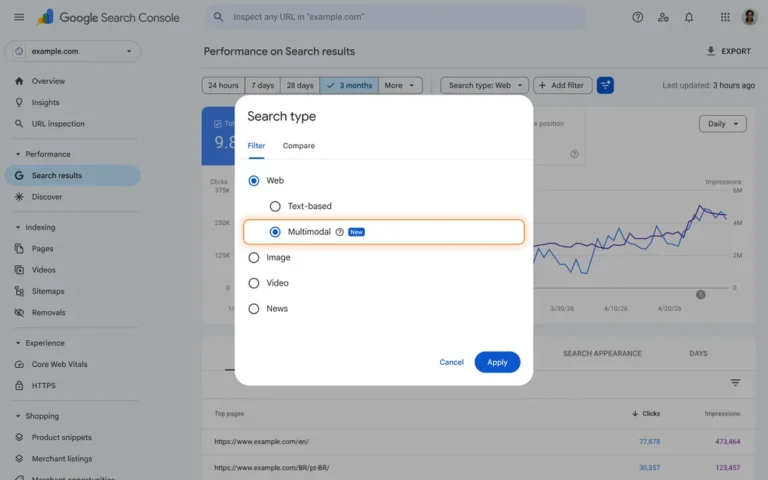
Image credit: Google Search Central
In addition to the standard Search results performance report, you can access the multimodal filter in the Generative AI features report. The multimodal filter is also available on social media platform properties.
Did previous GSC reporting include multimodal search data?
No. According to Google’s John Mueller, the multimodal filter has new data that wasn’t included in previous performance reporting.
In Google Search Console, you can use only one search type filter at a time, which defaults to web (text). So multimodal and text filter data isn’t combined in your reports.
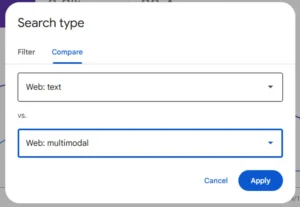
However, you can compare your text and multimodal reports by clicking on Search type > Compare > Web (text) and Web (multimodal).
This will display a chart with both text and multimodal data points.
Multimodal searching and e-commerce
So far, we’ve seen that e-commerce sites tend to get more traffic from multimodal search than other website types. This makes sense — people looking for a specific product might not know its name, but they might have an image of it. For example, they might:
- Screenshot an outfit off Instagram for style inspo and use Google reverse image search to find the individual clothing items later
- See an item on an international online store and search by image to find local stores selling the same product
- Go to a physical store and use Google Lens to identify and learn more about the products they want to buy
So if you run an e-commerce business, you want to ensure your products are visible to people using Google’s multimodal features. This means connecting your store to Google Merchant Center and using good-quality images, appropriate alt text, and descriptive product names and categories.
Image file names and alt text for multimodal search SEO
On a broader note, the GSC multimodal search filter highlights the importance of ensuring that Google can identify your images.
Google’s image identification models are very accurate. But sometimes it can’t tell what an image’s subject matter is with visuals alone, so it also uses the image’s file name and alt text for context.
Make sure your images are named appropriately with an accurate alt attribute, like this:
<img src="/canned-peaches.jpg" alt="Canned peach slices in juice"/>
Most website CMSes will let you set alt text when you add an image. Many e-commerce-focused CMSes will also automatically include alt text based on the product name, so you might not have to add any alt text manually as long as your products are named accurately.
In the US, Google has rolled out a Pinterest-like homepage for Google Images, which lets users browse recommended images and save them to collections. If this feature comes to New Zealand, having images with alt text and accurate file names will be even more important for getting your products in front of searchers.
Looking for a digital marketing expert?
Search Republic is an Auckland-based digital marketing agency with years of experience in e-commerce SEO and PPC. Contact us if you’re interested in learning how SEO can help your business grow.