If you’re writing a blog post or service page for a website, your HTML document structure helps search engines and AI crawlers better understand your content.
In this guide, we cover how proper HTML heading tags can help with SEO (search engine optimisation) and GEO (Generative Engine Optimisation), including:
- How to structure you
- How to check your page’s current HTML tags
- How semantic HTML and visual heading tag styling differ
What are HTML heading tags?
Headings refer to the HTML tags used to represent a heading of a page section. There are six heading levels, from <H1> to <H6>.
<H1>Heading 1</H1>
<H2>Heading 2</H2>
<H3>Heading 3</H3>
<H4>Heading 4</H4>
<H5>Heading 5</H5>
<H6>Heading 6</H6>
Heading 1
Heading 2
Heading 3
Heading 4
Heading 5
Heading 6
A heading element is a semantic HTML tag, which means it describes what the enclosed code does. In this case, the <H#> tags describe that the “Heading #” text is the heading of the following section.
While humans can’t see the <H#> heading tags directly on your page, bots can. Search engine crawlers and AI crawlers will read the heading tags to better understand your web page structure and content.
To structure your content clearly, you should use heading tags in a logical flow, just like writing a document with nested subheadings.
For example, an article about Sabrina Carpenter might follow this content structure:
- <H1>Why Sabrina Carpenter is awesome</H1>
- <H2>Who is Sabrina Carpenter?</H2>
- <H2>5 reasons I like Sabrina Carpenter</H2>
- <H3>She’s good at singing</H3
- <H3>She’s good at acting</H3>
- <H3>She’s funny</H3>
- <H3>She has a unique aesthetic</H3>
- <H3>She doesn’t care what other people think</H3>
- <H2>My favorite Sabrina Carpenter Songs</H2>
- <H3>Read your mind</H3>
- <H3>Feather</H3>
- <H3>Juno</H3>
- <H2>Join my Sabrina Carpenter fanclub</H2>
HTML headings for SEO
HTML heading tags give Google (and other search engines and AI platforms) more context on the different sections of your site. That lets Google better serve your content to users who are searching for specific information.
The most important heading, <H1>, should always refer to the overall topic of the page. This is the main title and will typically include the primary SEO keyword you’re targeting. There should only be one H1 heading per page.
<H2> is used for major section headings, <H3> for sub-sections of those, and so on.
Section headings should accurately represent the paragraphs nested within them, so use descriptive headings instead of generic or flowery text.
By following a valid semantic heading structure and using accurate headings that describe the purpose of the section, you can better help Google understand your content.
HTML headings are very important for accessibility, as screen reader users rely on them to navigate content on the page. Using multiple headings also improves readability by breaking content into easy-to-digest chunks.
While these factors may not directly impact SEO, proper heading hierarchy makes your website more helpful for anyone who finds it through Google search.
Do HTML headings need to contain SEO keywords?
According to Google’s John Mueller, putting keywords in headings won’t directly make your site rank higher. However, HTML headings do help Google and AI platforms understand the context of the section nested below it. That lets the search engine better serve your page to people looking for that content.
So it can still be a good idea to include keywords with a higher search volume in your main headings — there are more people searching for those terms, after all, and using heading tags helps Google direct them to your page.
How to check your HTML headings
The easiest way to check <H1> tags, <H2> tags, and so on, is with a browser extension.
One extension that offers this feature is the Ahrefs SEO Toolbar. To check your SEO heading levels, click on the extension icon, then click Content to see the page’s structure.
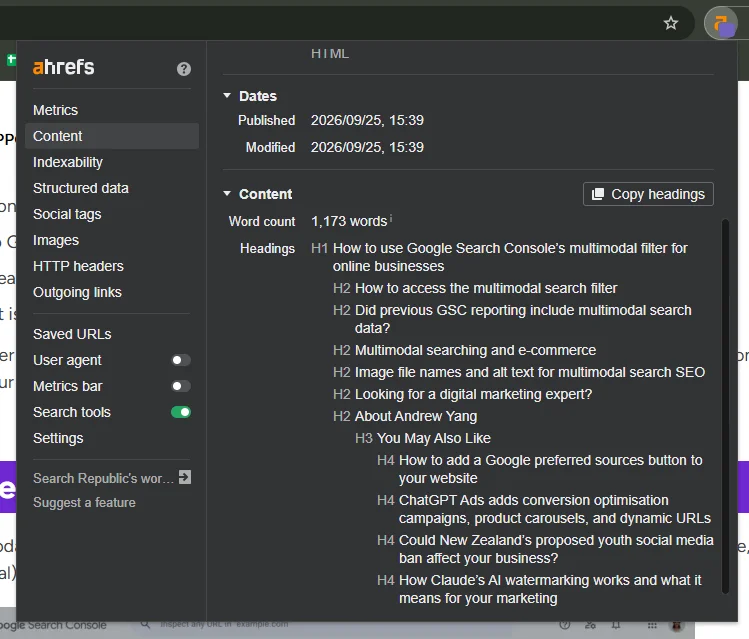
Note: Some crawler bots don’t load JavaScript, so they only see what’s in the actual source code. If page content is only called in by JavaScript, those bots won’t see all the headings, even if you see them as a user.
To check for HTML heading tags in your source code, press Ctrl+U on the page you want to review. Then search for "<H1", "<H2", etc.
Visually styling HTML headings
By default, <H1> headings have the largest font size, followed by <H2>, <H3>, and the other heading levels. These default font sizes are set in CSS (Cascading Style Sheets), the main web development language for visual styling.
One common issue we see is websites using headings purely based on visual appearance instead of semantic structure. This is especially common when the person who uploads the page content is disconnected from the person who set up the website, e.g. a company that hires an external web developer.
For instance, someone might use a lower-level heading tag (like <H5>) because they want a smaller font size, even though the <H2> tag would be more appropriate for the page structure.
To best organise content for search crawlers and AI, and to support assistive technology users, you should always try to follow a valid semantic HTML heading structure.
So if you want an <H2> heading to look smaller visually, but still retain the semantic meaning of ‘second-level heading’, you can use CSS to adjust the font-size of the text.
Editing heading tag CSS in a CMS
If you’re using a CMS (content management system), you usually don’t need to edit the CSS stylesheet directly. Instead, you may be able to style global attributes through your CMS’s theme editor.
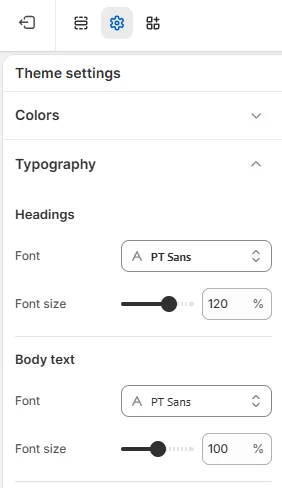
Changing heading sizes in Shopify
- Go to Online store and click Edit theme
- Click on Theme Settings > Typography
- Set your heading size
(Depending on your Shopify theme, you might not be able to change the individual <H#> sizes; in this case, you would need to edit the base theme code or apply custom CSS.)
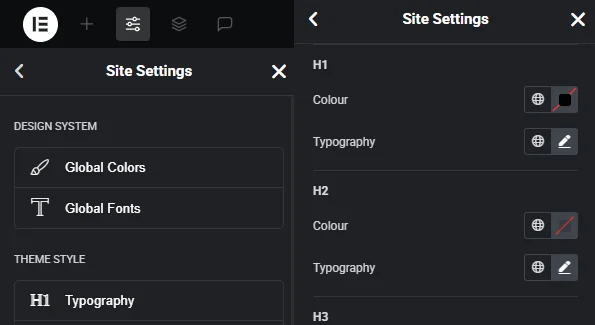
Changing heading sizes in Elementor (WordPress)
- Go to any page
- Click on Site Settings > Typography
- Set your default sizes for the different heading tags
If your CMS doesn’t let you edit global attribute styles, you can usually still apply visual changes to individual elements with inline style attributes. However, this is more difficult to manage if you want to make bulk visual changes later on, so we recommend using global heading styling where possible.
If you’re not sure how this works, you can ask your web developer for assistance.
Need SEO help?
Or you can ask us! If you’re looking for SEO-related guidance, give Search Republic a call. We’re a digital marketing agency based in Auckland, supporting clients across NZ and offshore with SEO, GEO, PPC and Paid Social management since 2013.
We’ve worked with dozens of partners over the years, helping them reach a wider audience through expert blog copywriting and technical SEO strategy.
For more information on how we can help your business reach more customers, contact us at: